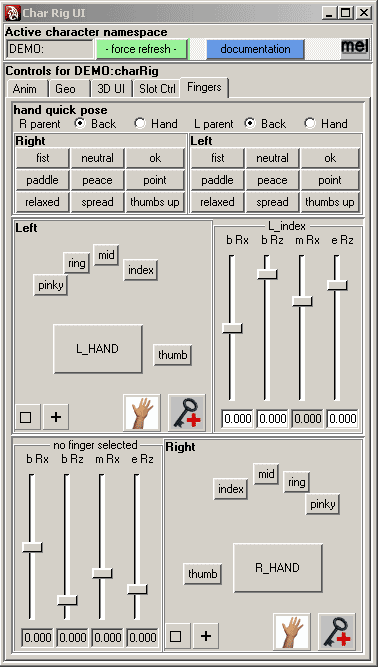
Here's a sample user interface I wrote a while ago to make life easier for animators on my team. Its a complex looking UI, but it's really just a precisely defined series of simple MEL commands.
At the top you can see I've called a window and labeled it "Char Rig UI".
Under that is a text field that displays the current reference namespace.
In the main section are five tabs, each labeled "Anim, Geo, 3D UI, Slot Ctrl, and Fingers". The fingers tab is the current selection.
In this tab we have radio buttons at the top, followed by two frames of hand poses. The frames each contain nine buttons labeled "fist, neutral, ok, paddle, peace, point, relaxed, spread, and thumbs up". In the lower right corner of this frame are two image buttons that make use of some images that already exist in Maya. They select all the fingers at once and set keyframes on the current selection.
The next frame is labeled "Left" and contains finger selection buttons that have been carefully placed into a form to look like a hand.
The frame after that one is currently labeled "L_index" because the controller for the left index finger was the most recently selected. The frame's label is set to dynamically change to match the current selection. The sliders in this frame also dynamically update to control the rotations of the bones in the most recently selected finger. Under each slider is a field that displays the current rotation value of the bone and axis that the slider above it controls. This is repeated for the right hand at the bottom.