
1: Open a new Maya scene
2: Create a poly cube and name it myCube. The name is important, even the capitalization.
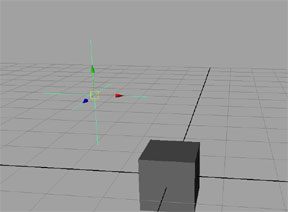
3. Create a locator. This will be our controller for the expression. Name it controller and raise it off the grid about 2 units, the amount is not important. It should simply be above the cube.
4.Open the expression editor. In the first menu change your Select Filter to "By Expression Name". You can type any name you chose into the first field. All expressions must have a name, default is expression1. The Evaluation menu should be set to "Always".
5. Copy the following into the large open field at the bottom:
$overControllerX = `getAttr controller.tx`;
$overCubeX = `getAttr myCube.tx`;
if($overControllerX - $overCubeX < .25 && $overControllerX - $overCubeX > -.25)
{setAttr myCube.ty 1;}
else{setAttr myCube.ty 0;}
myCube.tx = controller.tx - $overControllerX ;
6. Hit the "Create" button. If everything worked, you'll see the button now reads "Edit" and if your readout is visible at the bottom of your Maya scene, a Result message will be displayed. In your perspective camera view, you may have also noticed the cube move upward in Y.
7. Move the camera so you are looking at the cube from in front of it, or down the Z axis. Wave the controller (the locator you made) over the cube, moving back and forth in the X axis. You should see the cube jump upward whenever the controller is over the cube.
Why does this work?
In the first two lines we used a common MEL command called "getAttr". You can read all there is to know about this or any other MEL command by using Maya's own menus. You'll find the help for MEL commands under Help>MEL command reference.
The very first symbol in our expression was a "$". By using this symbol we are telling Maya that the letters that follow it until there's a space are all part of a variable name. Variables are nothing more than data stored as a name that we can use at a later time. The type of variable that we used here was called a float variable. That means that the acceptable information that we can store in our variable named $overControllerX can be any number, positive or negative, with any amount of decimal places. This is a very common type of variable. So common that we didn't even have to tell Maya what we had in mind. If we were doing something more complex, we would've had to give Maya fair warning. Fair warning for a float variable looks like this: float $overControllerX; The semi-colon at the end tells Maya that we've reached the end of our instruction. The ` symbol that sits on either side of our getAttr command tells Maya that we want it to perform a function before it gets to the end of this instruction. So the complete first line of instruction tells Maya this:
| a) keep some data in a variable named | $overControllerX |
| b) the data in our variable should be calculated now | = |
| c) you need to perform a function to calculate the data | ` |
| d) the function you need to perform is | getAttr controller.tx |
| e) now you have finished the function | ` |
| f) this completes this instruction | ; |
Note: The symbol ` is not the same as the 'single quote'. The ` symbol is below the Escape key and is a special character for calling functions in MEL.
Then we repeat this for another variable. The next three lines of our expression create a condition for Maya to evaluate. We begin with the word if to tell Maya to start its evaluation. Then we put our condition in parenthesis. In this case we want to know if the distance between our cube and our controller is less than 1/4 of a unit away; specifically in the X axis. Then we tell Maya that if the distance is that small, then the cube should be moved upward in Y one unit. Otherwise we want Maya to return the cube to zero. So the condition reads into Maya like this:
| a) we tell Maya we want to test for a condition |
if( |
| b) Maya needs to do some math for us. We ask it to subtract our second variable from our first | $overControllerX - $overCubeX |
| c) then we want to know if that difference is less than .25 units | < .25 |
| d) we also have another condition that we want to be true | && |
| e) we want to know if the same math results in a value that is greater than -.25 for movement in the negative X axis | $overControllerX - $overCubeX > -.25 |
| f) now we are finished with the condition | ) |
| g) if the condition turns out to be true we have something we want Maya to do | { |
| h) Maya should at this point perform another common function, move an object to a specific local position. To do this we use | setAttr myCube.ty |
| i) Maya is now done with satisfying this instruction | ; |
| j) This satisfies all instructions for our condition when it tests "true" | } |
| k) We also have an instruction for the condition when it tests "false" | else{ |
| l) For a false condition we want Maya to return the cube to zero. | setAttr myCube.ty 0 |
| m) That's it. Finish the instruction and complete the condition | ;} |
The final line in our expression is only there to trick Maya into evaluating for every motion of the controller. Without this line the expression, like most expressions, would only work when the time was changed. Go ahead, test it. Open the expression editor if you have closed it and edit the script by deleting the last line and hitting edit. Now try moving the controller back and forth over the cube. Nothing happens right? The expression is still valid but now Maya doesn't feel obligated to do the math. Try setting key frame animation on the controller that makes it pass over the cube in the X axis. Now move the time slider to scrub your animation. The cube moves up when the controller passes during the animation, but nothing happens when you move it by hand.
Why doesn't this work?
Maya needs a reason to calculate an expression. Unless something has changed in the scene that Maya knows requires an expression, Maya skips over all the stuff in the expression editor. After all, there could be dozens of scripts in there that have nothing to do with the recent changes that would take Maya plenty of time to evaluate. To make sure Maya paid attention to our expression, we finished by making a direct connection between something we knew would be moving and something we wanted to be evaluated.
| a) Like all instructions in Maya, we name the thing we want to be evaluated first | myCube.tx = |
| b) Then we name something we know will be moving in a simple mathmatical question | controller.tx - $overControllerX |
| c) Then we finish the instruction with the symbol tha we use to finish all instructions | ; |